
Your first point of contact should always be the seller. Most sellers want to keep buyers happy and are willing to resolve order issues quickly.
Raise a dispute if you’ve contacted the seller and the issue isn’t resolved, or if the seller isn’t responding.
When Can You Raise a Dispute?
You can raise a dispute from your order page once the seller has marked your order as delivered, and after you’ve marked it received, for as long as your buyer protection lasts. Protection is usually 5 days after delivery, and longer for some games and categories.
- Not delivered yet? If the seller hasn’t delivered by the guaranteed delivery time, you can cancel the order from your order page and get a refund.
- Instant-delivery orders, keys and gift cards: open the chat with the seller first. The Dispute button becomes available after that.
- Protection has ended? Your order page will show a link to our 24/7 support team. If the issue is genuine, our team can reopen disputes on your order so you can raise one.
- An order can have up to two disputes. After that, contact support.
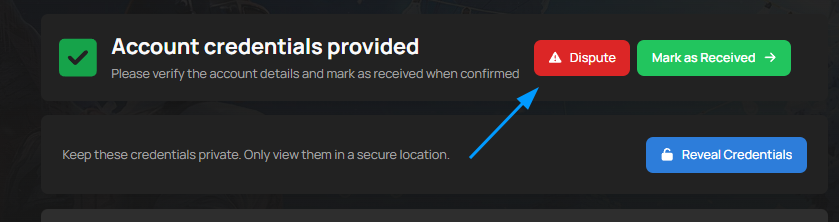
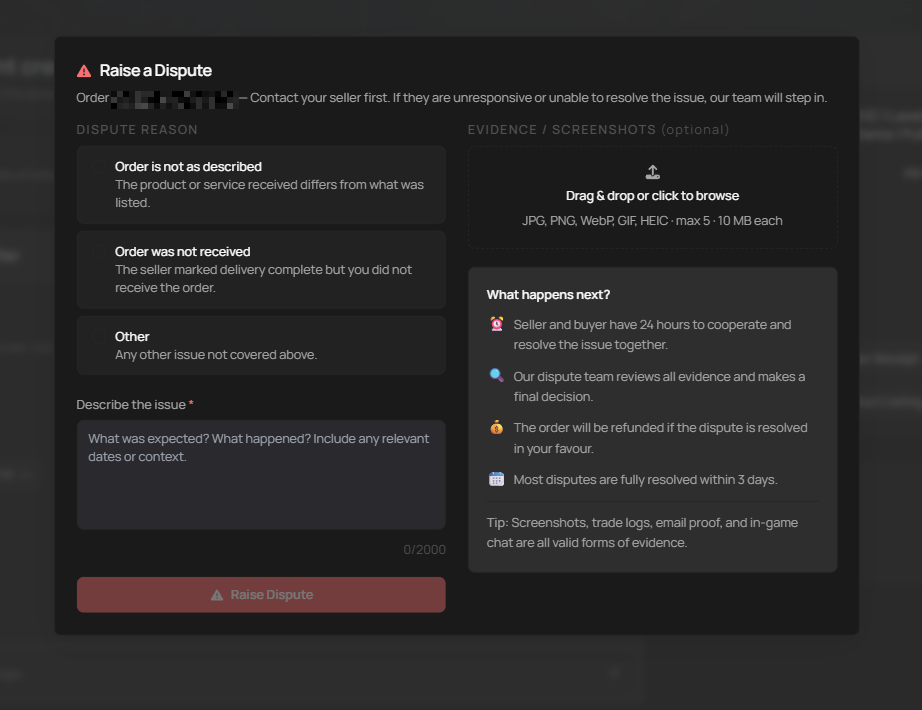
Dispute Reasons
When you raise a dispute, you choose the reason that best fits your order. The reasons depend on what you bought.
| Order Type | Reasons You Can Choose |
|---|---|
| Accounts | Order not received, Not as described, Account login doesn’t work, Account was taken back, Other |
| Currency, Items and Top-Ups | Order not received, Wrong amount delivered, Not as described, Delivered late, Other |
| Keys and Gift Cards | Order not received, Code doesn’t work, Wrong region, Other |
Buying an account? Keep it as it is until the dispute is resolved. Don’t play on it, resell it or change the login details, or buyer protection may not cover it.
What Happens After You Raise a Dispute?
The seller is notified straight away and has a set time to respond.
| Order Type | Seller Response Window | What the Seller Should Provide |
|---|---|---|
| Accounts | 12 hours | A fix, replacement login details, a refund, or evidence the account works as described. |
| Currency | 2 hours | Proof of delivery, such as trade screenshots or a video. |
| Top-Ups | 2 hours | Proof the top-up reached the correct account, character ID or platform account. |
| Items | 2 hours | Delivery evidence such as trade screenshots, videos or in-game confirmation. |
| Keys and Gift Cards | 2 hours | Evidence the code was valid, or a working replacement or refund. |
If the seller doesn’t respond in time, the dispute goes straight to the PlayerBay Dispute Team.
Seller Offers
The seller can offer to resolve the dispute with a refund. For accounts delivered automatically, they can also offer replacement login details or a different account. Once an offer is made, you have 24 hours to decide:
- Accept the offer to resolve the dispute.
- Decline the offer to send the dispute to our Dispute Team straight away.
- If you don’t answer within 24 hours, the offer expires and our Dispute Team reviews the dispute.
How to Provide Evidence
Both the buyer and seller should upload proof within 12 hours of the dispute opening. That’s when our Dispute Team starts reviewing. You can add screenshots when you raise the dispute and add more from your order page afterwards (images up to 10 MB each). You can also share videos in the order chat.
| Evidence Type | Why It Helps |
|---|---|
| Order chat messages | Shows what the buyer and seller agreed to, what was delivered, and how each side responded. |
| Listing title and description | Helps confirm what the seller promised in the original offer. |
| Screenshots or videos | Can show whether an account works, an item was delivered, or a trade was completed. |
| Email or security change screenshots | Can help prove whether account credentials, email access, or recovery details were changed. |
| Trade or transaction proof | Helps confirm whether currency, items, top-ups, or services were delivered. |
| Ban, suspension, redemption or access error proof | Helps show that the buyer can’t access or use the purchased product. |
Tips for Sellers Handling a Dispute
- Read the buyer’s issue carefully before responding.
- Respond within the response window for your order type. Missing it sends the dispute straight to our Dispute Team.
- Upload proof that the order was delivered correctly within 12 hours.
- Offer a refund or replacement when the buyer has a genuine problem. It’s usually the fastest way to close the dispute.
- Stay professional. If you can’t reach an agreement, share your evidence and let the Dispute Team decide.
- Earnings from a disputed order stay on hold until the dispute and the buyer’s protection period are over.
How Disputes Are Resolved
| Outcome | What Happens |
|---|---|
| Buyer wins the dispute | The order is refunded. Refunds cover the price you paid for the item (and any warranty); the payment processing fee isn’t refunded. |
| Partial refund | Part of the price is refunded and the order stays completed. |
| Replacement accepted | The replacement is delivered and the dispute closes. |
| Seller wins the dispute | The order is marked as completed and the seller receives the funds once the buyer’s protection period ends. |
| Problem solved | If the issue gets fixed, the buyer can close the dispute at any time with Problem solved on the order page, before our team makes a decision. |
Refunds go to your PlayerBay balance. If you paid by card, you may be able to choose a refund to your card instead. Most disputes are fully resolved within 3 days.
Chargebacks: if you open a chargeback with your bank, we can’t refund that order through PlayerBay while the bank is reviewing it. Raising a dispute on PlayerBay is the fastest way to get help.
Only a small percentage of orders on PlayerBay result in disputes. If it happens to you, the dispute will be reviewed fairly and handled as quickly as possible.