
We understand that order problems can be frustrating. Most issues can be resolved quickly by contacting the seller first, sharing clear details, and using PlayerBay’s dispute process when needed.
This guide explains what to do if your order is delayed, incomplete, incorrect, or not working as expected.
Step 1: Contact the Seller
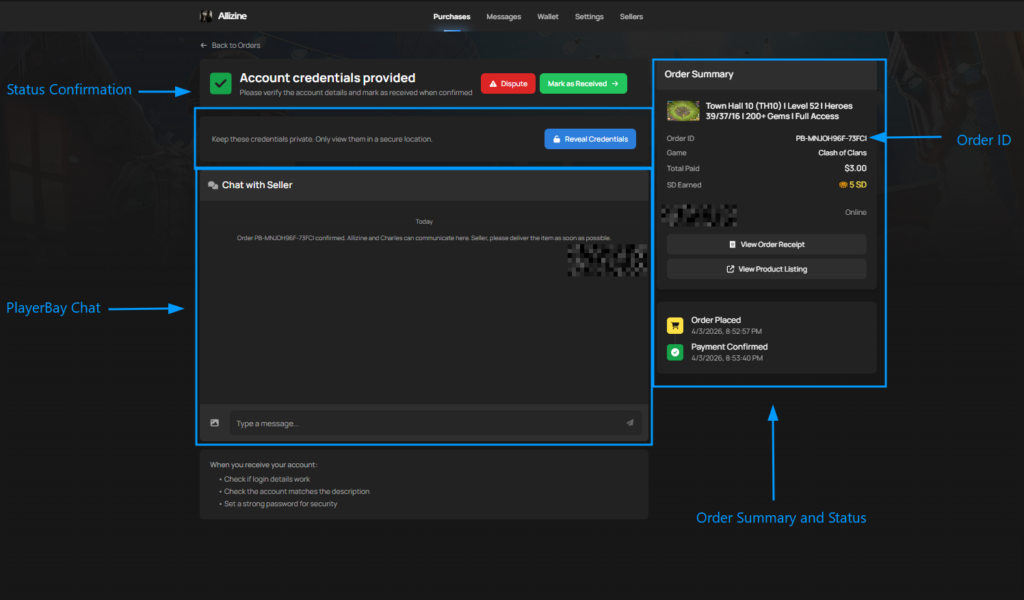
Your first step should always be to contact the seller through the PlayerBay order chat. Most sellers want to resolve issues quickly and keep buyers satisfied.
Use the order chat to explain the problem clearly and give the seller a chance to help.
What to Include in Your Message
Clear communication helps the seller understand the issue and respond faster.
| Issue Type | What to Send |
|---|---|
| Order not delivered | Ask for an update and mention that the delivery window has passed. |
| Wrong product received | Explain what was delivered and how it differs from the listing. |
| Account login does not work | Share the error message, login issue, or screenshot showing the problem. |
| Missing items or currency | Explain what amount or item is missing and provide screenshots if available. |
| Top-up not received | Send your character ID, account ID, or platform details again so the seller can verify delivery. |
Step 2: Raise a Dispute If Needed
If the seller is not responding, the delivery window has passed, or you cannot reach a resolution, you may be able to raise a dispute directly from your order page.
Click the Dispute button on the order page and explain the issue clearly. Include screenshots or other proof whenever possible.

When Should You Raise a Dispute?
A dispute should only be raised when the issue cannot be resolved directly with the seller.
- The seller is unresponsive after the delivery window has passed.
- The product does not match the listing description.
- The order was not delivered on time.
- The account details are incorrect, incomplete, or not working.
- The item, currency, or top-up was not received.
- The seller refuses to help resolve the issue.
What Happens After You Raise a Dispute?
After a dispute is raised, both the buyer and seller are expected to cooperate, share proof in the order chat, and try to resolve the issue.
If the issue is not resolved between both sides, PlayerBay’s Dispute Team will review the order details, chat history, listing information, and any evidence provided before making a final decision.
| Dispute Stage | What Happens |
|---|---|
| Buyer raises dispute | The buyer explains the issue and provides any available proof. |
| Seller responds | The seller has a chance to resolve the issue, provide delivery proof, or offer a solution. |
| Evidence is reviewed | PlayerBay reviews order chat, listing details, screenshots, delivery proof, and other relevant information. |
| Final decision | The dispute is resolved in favor of either the buyer or seller based on the evidence. |
If the dispute is resolved in your favor as the buyer, you may receive a refund. Most disputes are fully resolved within 3 days.
Tips for a Faster Resolution
- Keep all communication inside the PlayerBay order chat.
- Explain the issue clearly and calmly.
- Provide screenshots, videos, error messages, or delivery proof when available.
- Give the seller a fair chance to respond before escalating.
- Do not use off-platform communication or payment methods.
PlayerBay’s Dispute Team reviews cases fairly and works with both sides to reach the right resolution. Keeping clear records in the order chat helps us resolve issues faster.