
To list an account for sale on PlayerBay, your seller account must be verified. Account listings should be accurate, clearly described, and include everything the buyer needs to understand what they are purchasing.
PlayerBay only permits the sale of full-access accounts. This means the buyer must receive the account login, password, email access when applicable, and any recovery or security information needed to take control of the account.
Before You Create an Account Listing
Before listing an account, make sure the account is ready to transfer and that you have all required access details available.
| Requirement | What It Means |
|---|---|
| Verified Seller Account | Your PlayerBay account must be verified before you can list accounts for sale. |
| Full Account Access | You must be able to provide the buyer with full access to the account after purchase. |
| Accurate Listing Details | The title, description, images, price, and delivery details must accurately represent the account. |
| Transfer Readiness | You should have the login details, email access, recovery information, and any extra instructions ready before the account sells. |
Creating Your Account Listing
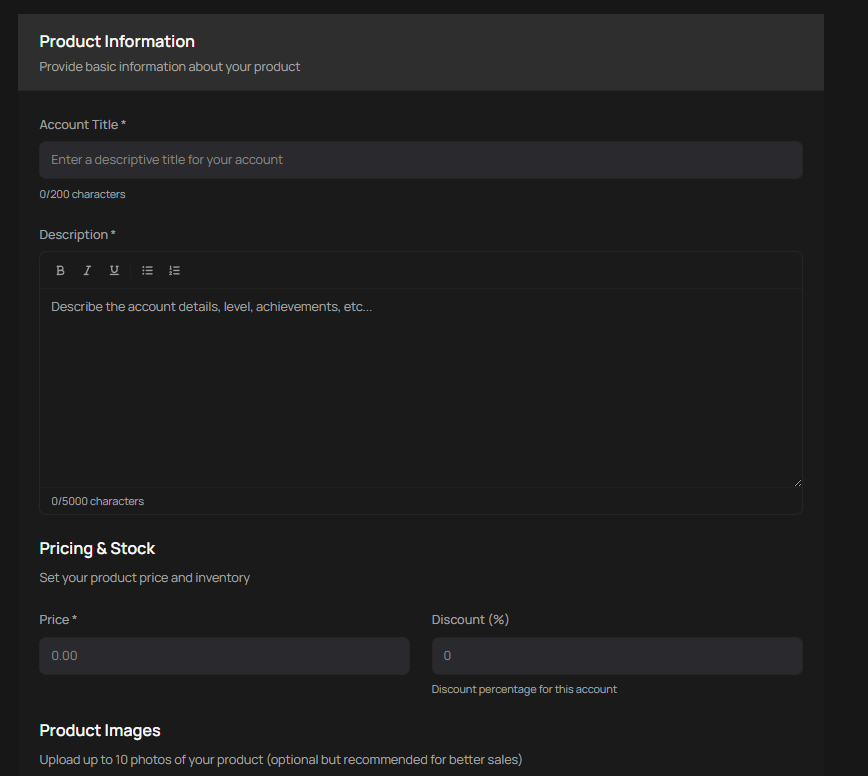
When creating your listing, include the most important account details in the title and provide as much relevant information as possible in the description.
- Choose the correct account category.
- Write a clear title that describes the account accurately.
- Add a detailed description with the account’s rank, level, progress, inventory, platform, region, linked services, or other important details.
- Select the delivery time.
- Upload up to 10 images of the account.
- Choose whether the account will use Instant Delivery or Manual Delivery.
- Set your asking price.
- Submit your offer for sale.
Account Delivery Options
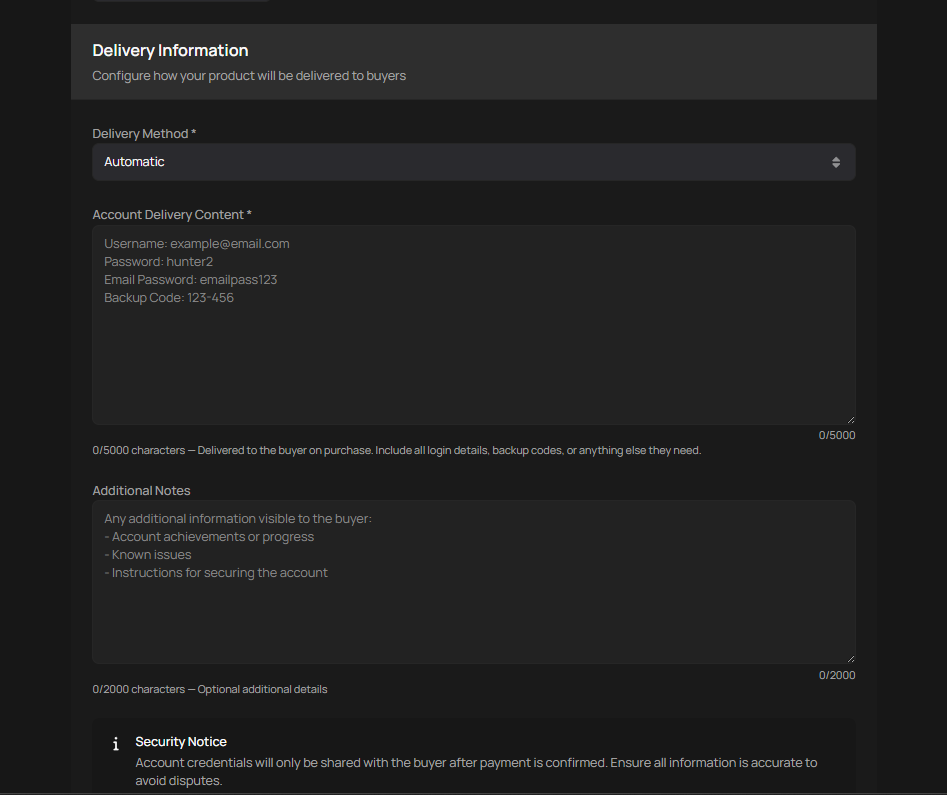
PlayerBay supports both Instant Delivery and Manual Delivery for account sales. The option you choose determines how the buyer receives the account details after purchase.
| Delivery Type | How It Works | Best For |
|---|---|---|
| Instant Delivery | You securely provide the account details on the listing page. After purchase, the details are shown to the buyer automatically. | Accounts that are ready to transfer immediately with complete login, email, and recovery information. |
| Manual Delivery | You provide the account details through the PlayerBay order chat after the buyer completes payment. | Accounts that require confirmation, manual transfer steps, email changes, or extra buyer instructions. |
What Account Information to Provide
Whether you use Instant Delivery or Manual Delivery, the buyer must receive everything needed to access and secure the account.
| Information Type | What to Include |
|---|---|
| Account Login | The username, account ID, email, or other login identifier used to access the account. |
| Password | The current password for the account. |
| Associated Email | If an email is attached to the account, provide the buyer with full access to that email when required for full ownership. |
| Email Credentials | The email login and password, if the buyer needs email access to secure or transfer the account. |
| Security Questions | Security questions and answers, if they are present on the account. |
| Recovery Information | Backup codes, recovery codes, PINs, two-factor details, or other information needed to secure the account. |
| Transfer Instructions | Any steps the buyer should follow to change the password, update the email, remove recovery methods, or secure the account after purchase. |
PlayerBay only permits the sale of full-access accounts. If an account has an attached email, recovery method, security question, or extra login step, the buyer must receive the information needed to take full control.
Once Your Account Sells
When a buyer purchases your listing, follow the delivery method selected for the order.
- If the listing uses Instant Delivery, the buyer will automatically receive the account details you provided on the product.
- If the listing uses Manual Delivery, send the account details through the PlayerBay order chat.
- If the account requires an email change, help complete the transfer by providing any required confirmation from the associated email.
- Keep all communication and delivery details inside PlayerBay.
Where to Deliver Account Information
Account information must always be delivered through PlayerBay. For Instant Delivery, provide the details securely on the listing page. For Manual Delivery, share the details through the PlayerBay order chat.
Do not send account credentials through Discord, Telegram, email, social media, text messages, or any other off-platform method. Keeping delivery on PlayerBay helps protect both the buyer and seller if support needs to review the order.
Before Submitting Your Listing
Review your listing carefully before publishing. Make sure the account details are accurate, the delivery method is correct, and the buyer will receive full access after purchase.
- Confirm the title and description match the account exactly.
- Check that the images show the correct account.
- Make sure the price and delivery time are accurate.
- Verify that all login, email, and recovery information is available.
- Use Instant Delivery only when the account is ready to deliver automatically.
- Use Manual Delivery if the account requires additional transfer steps through chat.